
Where should I buy SCaptcha?

Two questions point you to the suitable store.

Are you a WoltLab Cloud customer?

Yes

Both stores deliver the same SCaptcha package.

Settings

Font Size

These settings are saved in this browser.

SCaptcha

Bot protection built for WoltLab Suite

One click is enough. The browser handles a short Proof-of-Work task, then your WoltLab installation checks the answer. The standard flow does not depend on an external CAPTCHA service.

Read Docs
  • version2.3.0
  • platformWoltLab Suite 6.2
  • challenge60s
scaptcha.verify()
$issue --algorithm SHA-256
01

Core verificationrandomSalt: 32 bytes

local
02

Proof-of-Workbrowser → WoltLab Suite

solve
03

HMAC + sessionserver-side validation

verify
request.accepted200
Explore

Start simple. Add checks when you need them.

Proof-of-Work is the base layer. Sentinel, browser signals, analytics, and Under-Attack mode can be switched on separately.

01

Always-on Proof-of-Work

Each challenge uses its own cryptographically random 32-byte salt. Your WoltLab installation validates the salt, hash, algorithm, answer, and HMAC against the issuing session. The challenge expires after 60 seconds and does not require an external CAPTCHA provider.
02

Sentinel Risk Engine

Sentinel can score headers, network data, country, time zone, and optionally the email domain on the server. Sentinel is off by default.

03

Client-Side JS Checks

Optional browser checks can examine interaction and runtime signals. They are off by default.

04

Under-Attack Mode

Under-Attack mode places a check in front of the site. After a successful check, a signed cookie acts as short-term proof of access.

05

Built-in Analytics

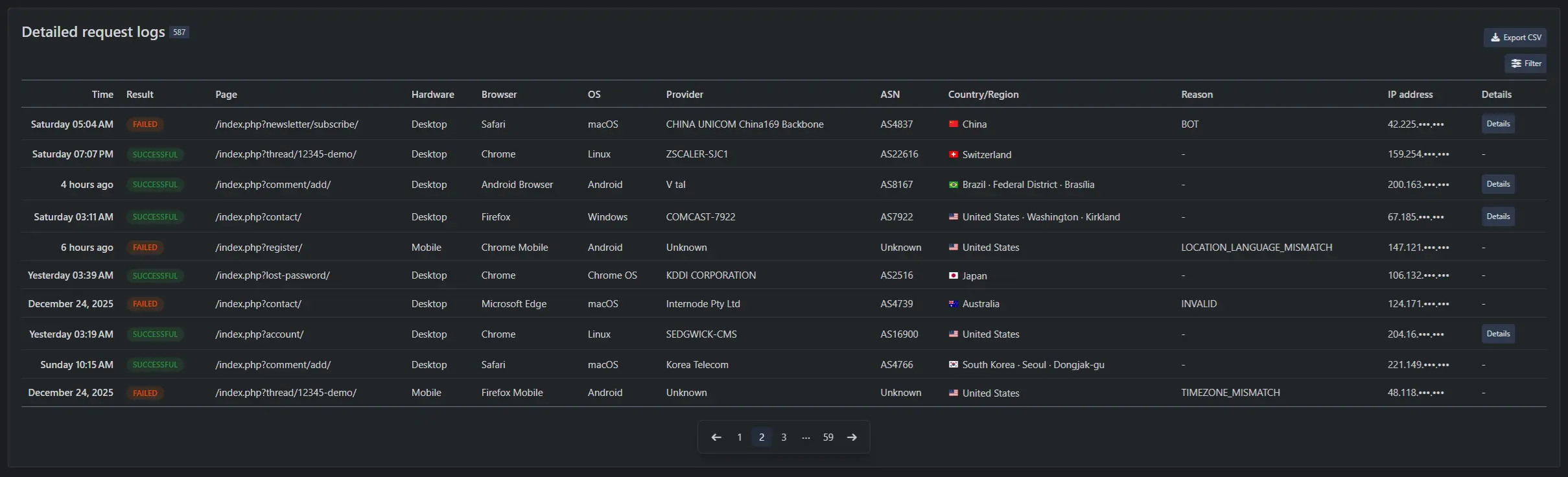
The ACP shows results and individual requests. Request analytics are on by default.

06

WoltLab Suite 6.2

SCaptcha 2 runs on WoltLab Suite 6.2 only. For older versions, SCaptcha 1 delivers the classic PoW widget without JS checks, Sentinel, or analytics.

A widget that fits the form

Choose the language, when verification starts, and where the widget appears. The controls below update the real SCaptcha widget.

language
Built-in widget translations
auto
off · onload · onsubmit
floating
inline · top · bottom
<scaptcha-widget>
Language
Start
Position
language="auto" auto="off" floating="off"

This preview uses test mode and does not submit form data.

What stays local, and what does not

The standard check ends in your WoltLab installation. Only the optional proxy check sends the public IP address to proxycheck.io.

01BrowserProof-of-Work
challenge
02WoltLab SuiteSelf-Hosted
optional
03proxycheck.iooff by default
01

Core verification

Each challenge uses its own cryptographically random 32-byte salt. Your WoltLab installation validates the salt, hash, algorithm, answer, and HMAC against the issuing session. The challenge expires after 60 seconds and does not require an external CAPTCHA provider.

02

Proxy check

This option is off by default. If you enable it, SCaptcha sends the visitor's public IP address to proxycheck.io for proxy, VPN, or Tor evidence. SCaptcha 2.3.0 sends tag=0 by default; administrators can opt in to provider logging. The IP address is transmitted for every lookup either way.

03

Security cookies

A pre-submit marker and the optional text/audio proof are valid for 5 minutes. Under-Attack mode uses a signed, user-agent-bound access cookie for 5 to 30 minutes; the default is 10. Sentinel can store a server-side rejection in a separate signed cookie for 10 minutes. Sentinel itself is off by default.

04

Analytics and retention

Request analytics are on by default. Logs can contain linkable operational data, including IP address, user agent, request, network and location fields, reasons, and submitted browser telemetry. Retention defaults to 90 days and can be set from 1 to 3,650 days. Turning analytics off stops new collection but does not erase existing rows or exports.

Try SCaptcha

This is the actual widget from SCaptcha 2.3.0. It runs the Proof-of-Work step and then opens the local visual code challenge.

demo.local / no request submitted

Demo form

Security check

Complete the SCaptcha check first.

This is a local demo. The content stays in this browser and is not transmitted.

Privacy and accessibility

SCaptcha keeps the core check inside your WoltLab installation. The documentation explains separately what optional services, cookies, logs, and browser checks change.

Where SCaptcha sends data

The standard check stays in your WoltLab installation. Optional features are listed separately below.

Privacy in operation

Accessibility

Behavioral scoring and Sentinel are off by default. Unsupported or privacy-restricted signals are neutral. Pointer movement is required only for mouse input, scrolling only on scrollable pages, and keyboard or touch activation does not need fabricated mouse movement.

Test accessibility
All compliance notes

See what SCaptcha decides

The ACP shows successful, failed, and blocked checks alongside individual requests. The screenshot contains sample data from SCaptcha.

Analytics & Operations
ACP / SCaptcha / Analytics
SCaptcha request log

When the whole site needs a gate

Under-Attack mode puts SCaptcha in front of public pages. After verification, a signed cookie acts as short-term proof of access.

Under-Attack Mode
under_attack.accessenabled
  1. 01

    Check before the requested page

  2. 02

    Signed proof bound to the user agent

  3. 03

    Return to the original destination

Cookie lifetime5 to 30 minutes
10 minutes by default

Install SCaptcha

The package uses WoltLab Suite's standard package management.

  1. 1

    Purchase the package

    Choose the WoltLab Plugin Store or the SoftCreatR shop and download SCaptcha.

  2. 2

    Upload and install

    Open package management in the ACP, upload the package, and complete the installation.

  3. 3

    Select SCaptcha

    Choose SCaptcha as the active CAPTCHA, then enable only the additional checks you need.

Choose where to buy

Both stores deliver the same SCaptcha package.